Tips & Tutorials -
Tutorial Part Two: Buy and Sell
 In this tutorial, we will be showing you a step-by-step process on how to Buy and Sell a stock. Although it may seem simple given that the procedures are easy, it takes more than just steps in the trading world. In order to maximise your experience,we suggest looking beyond this tutorial after you grasp a basic understanding of the application.
How to Buy/Sell a stock using TradeHero:
Trade Price is set to the market ask price when buying, and the bid price when selling. This is to simulate Market Order type transactions. For some stocks, we don’t have ask and bid data. For such stocks, we use the last traded price of the stock. One thing to note: Trade Quantity is limited to 20% of Average Daily Volume or Current Day Volume, whichever is higher. 1. In the buy/sell screen, select a name of the stock. Use the search engine to search for stocks the supported exchanges. You can search by company or symbol name. Trending stocks simply means the stocks that other TradeHero users are buying and selling.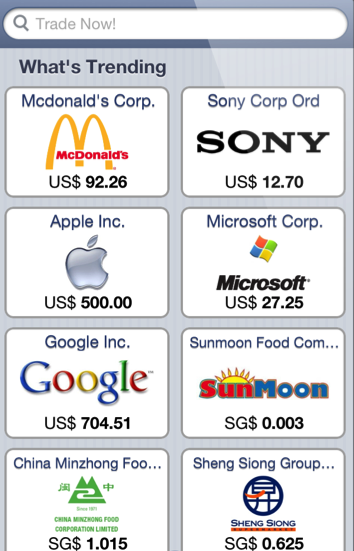 2. Use the charts and information provided on the screen to view market data to help you in your decision on whether to buy or sell a stock. (These information will not be enough, it’s just a guide. You will definitely need more information than that.) Then, use the slider to choose the quantity of stocks that you want to buy. Alternatively, you can use the prefixed amounts found below the slider.
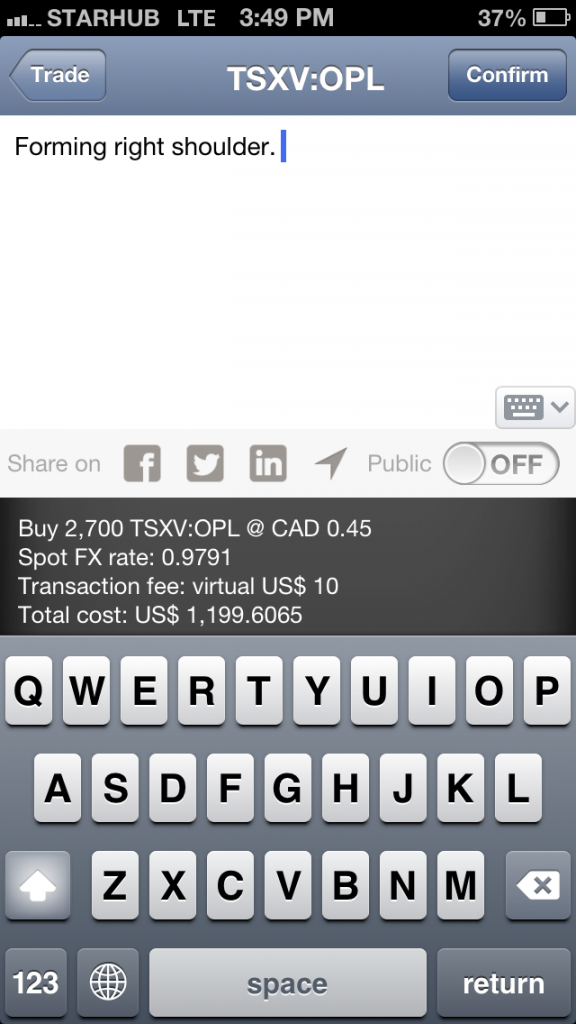
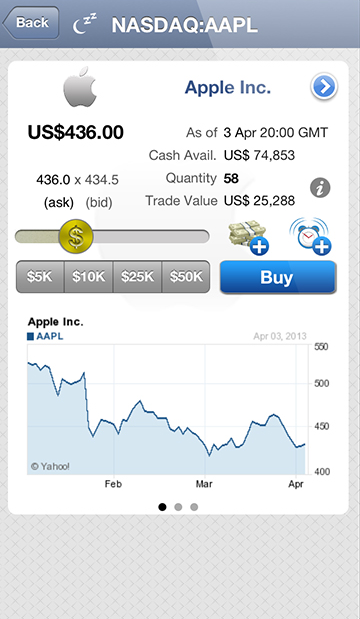 3. After clicking the Buy button, you can choose to post comments for reasons to buy or sell the stock. You can also choose to share your buy on your social media feeds like Facebook, Twitter and LinkedIn. When you’re done, click on Confirm. And there you go, you have just bought yourself a stock!
 4. Similarly, when you want to sell a stock, you can access it through your positions by clicking the middle button and tapping on the – button. Then, repeat steps 2 and 3.
Buying and selling a stock isn’t all that hard once you get the hang of it. Of course, we strongly advise you to do prior research and read up on the actual stock market before buying or selling a stock. After all, all our data is reflective of the real world and stock market, so why not get more practice to prepare yourself for the real thing?
Another important function of the application is the Trade History.
4. Similarly, when you want to sell a stock, you can access it through your positions by clicking the middle button and tapping on the – button. Then, repeat steps 2 and 3.
Buying and selling a stock isn’t all that hard once you get the hang of it. Of course, we strongly advise you to do prior research and read up on the actual stock market before buying or selling a stock. After all, all our data is reflective of the real world and stock market, so why not get more practice to prepare yourself for the real thing?
Another important function of the application is the Trade History.
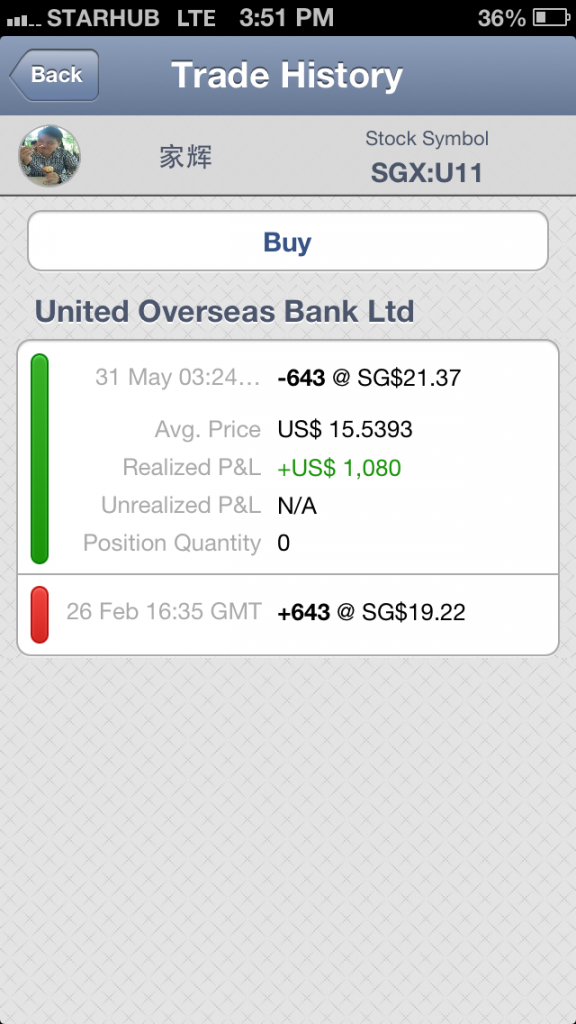 This screen shows the detailed trade history for a position. You can view the quantity bought or sold, the date and the average price paid after the transaction.
Realized P&L is profit or loss banked into your virtual cash after the transaction.
Unrealised P&L is the floating profit or loss due to curret market price of the underlying stocks.
Find out more at our FAQ page!
Oh yes, not forgetting one of the most significant features of TradeHero: Stock Alerts.
Stock alerts are designed specially for users to help receive information and keep up to date on stock price movements so that users like you are able to take necessary action at the best possible time. You will receive instant notifications whenever a stock hits a target price or moves by a selected percentage. Such prime information at such a low price, it is definitely a feature not to missed if you want to keep up with the stock market!
Using these information, you will be able to buy and sell a stock on TradeHero easily. Get started! Stay tuned for more tips from TradeHero. Have a look at Part One of the tutorials here, or visit our Facebook at TradeHero!! Til then!
This screen shows the detailed trade history for a position. You can view the quantity bought or sold, the date and the average price paid after the transaction.
Realized P&L is profit or loss banked into your virtual cash after the transaction.
Unrealised P&L is the floating profit or loss due to curret market price of the underlying stocks.
Find out more at our FAQ page!
Oh yes, not forgetting one of the most significant features of TradeHero: Stock Alerts.
Stock alerts are designed specially for users to help receive information and keep up to date on stock price movements so that users like you are able to take necessary action at the best possible time. You will receive instant notifications whenever a stock hits a target price or moves by a selected percentage. Such prime information at such a low price, it is definitely a feature not to missed if you want to keep up with the stock market!
Using these information, you will be able to buy and sell a stock on TradeHero easily. Get started! Stay tuned for more tips from TradeHero. Have a look at Part One of the tutorials here, or visit our Facebook at TradeHero!! Til then!