Tutorial Part One: Introduction
This tutorial introduces to you the basic features of TradeHero. If you are a new user, this will be an advisable place to start the ball rolling by understanding what TradeHero is. If you are an existing user, you may also find this tutorial useful as a refresher.
Firstly, what is TradeHero? To cut the story short, we bring TradeHero to you in 3 parts:
-
Learn to Trade
-
Earn Money
-
Follow Experts
For more details, refer to our main website here: TradeHero
To facilitate better and effective learning, we have broken down the main features into details. By reading through the tutorial, we hope to clarify any doubts concerning the usability of the application, as well as to give an overview of what exactly is happening as you use TradeHero.
1. Profile Screen
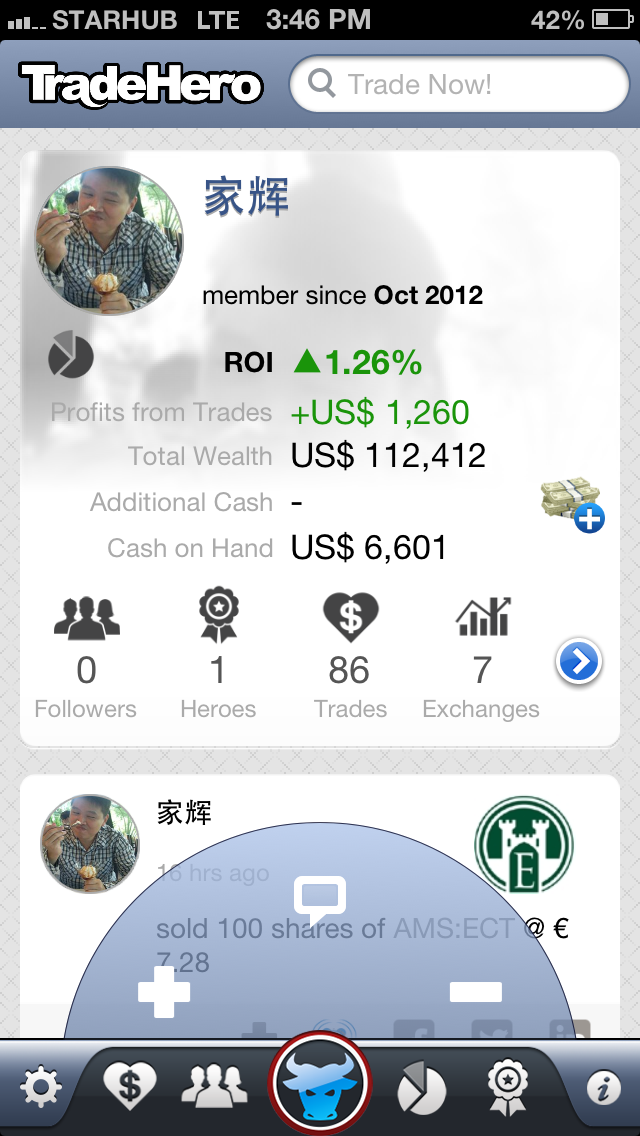 Your profile screen displays the returns on your portfolio of stocks, the users paying to follow your trades and comments, as well as your performance ranking on different leaderboards.
You can tap on the center action button to open up more options.
Your profile screen displays the returns on your portfolio of stocks, the users paying to follow your trades and comments, as well as your performance ranking on different leaderboards.
You can tap on the center action button to open up more options.
- The + symbol to buy shares
- The - button to sell shares
- The speech symbol to post comments. Comments will be sent to your followers and will also appear on your timeline. You are also given options to share your comments on Twitter, Facebook and LinkedIn.
2. Community
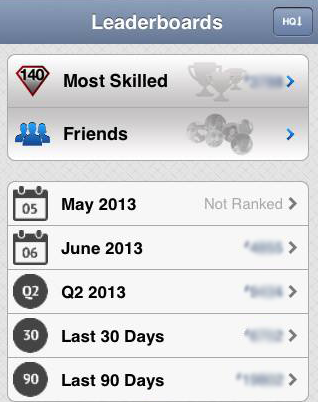 Find top traders in the leaderboards, ranked either by raw P&L or by our custom Hero quotient ranking algorithm. You can filter by stock exchange, industry sectors, monthly and quarterly returns and Most Skilled traders.
Also, you can compete with your friends on the Friends Leaderboard. How so? By connecting accounts from Facebook, Twitter and LinkedIn to see how you stack up amongst your friends.
Find top traders in the leaderboards, ranked either by raw P&L or by our custom Hero quotient ranking algorithm. You can filter by stock exchange, industry sectors, monthly and quarterly returns and Most Skilled traders.
Also, you can compete with your friends on the Friends Leaderboard. How so? By connecting accounts from Facebook, Twitter and LinkedIn to see how you stack up amongst your friends.
3. Portfolio
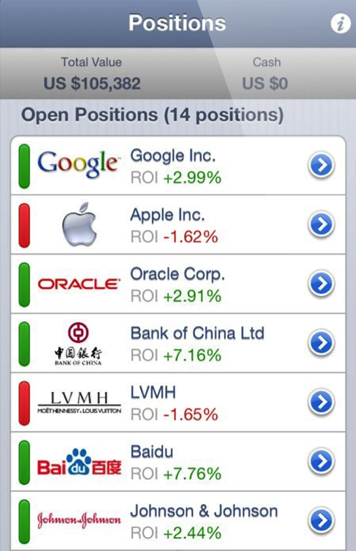 This screen details your current portfolio of stocks: open positions are shown at the top. Closed positions are displayed below. You can tap on the names of stocks to view more details about your positions. Also, you can tap on the right arrows to see the trade history for each position.
4. Followers
 This screen displays the total number of followers and money you earned from them since you joined TradeHero. Drill down each follower’s name to see the revenue history.
5. Heroes
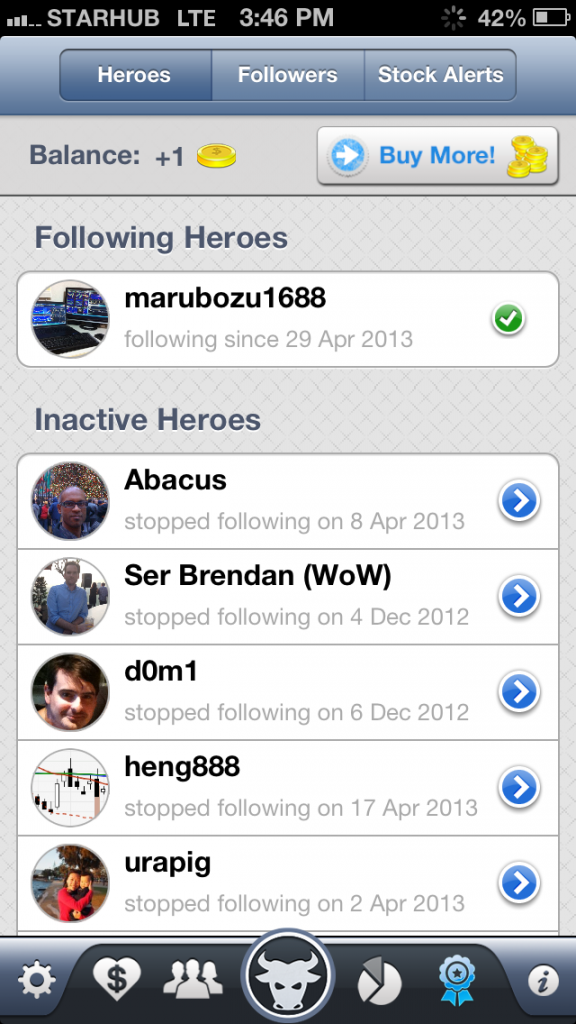 To follow a hero, 1 TH credit will be deducted per month. Following a Hero will give you instant push notifications whenever the Hero makes a trade or a comment.
You will also receive s TradeHero Market Digest email, detailing all the trades and commentary made by the Hero over a weekly or monthly period.
Active heroes are users you are currently following and paying for. Inactive heroes are users that you have stopped paying for.
To follow a hero, 1 TH credit will be deducted per month. Following a Hero will give you instant push notifications whenever the Hero makes a trade or a comment.
You will also receive s TradeHero Market Digest email, detailing all the trades and commentary made by the Hero over a weekly or monthly period.
Active heroes are users you are currently following and paying for. Inactive heroes are users that you have stopped paying for.
6. Leaderboards
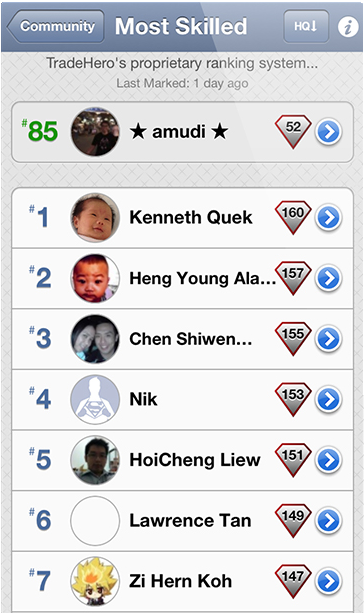 Leaderboards rank the performance of individual users worldwide, make more trades and fight to reach the top of the leaderboard to gain followers!
To expand your options, you can tap on the names of the users. You can also view the user’s previous closed positions to find out how he reached his current profit level, but to view the user’s current open positions and receive push notifications when the user makes trades and comments, you will have to tap Follow User and subscribe to him.
We have just introduced the basic features of TradeHero and what we have to offer. Do look out for our next few tips and tutorials where we will explain more on how to Buy and Sell Stocks on TradeHero. Visit our Facebook page for updates and stock tips as well at TradeHero! Stay tuned!
Leaderboards rank the performance of individual users worldwide, make more trades and fight to reach the top of the leaderboard to gain followers!
To expand your options, you can tap on the names of the users. You can also view the user’s previous closed positions to find out how he reached his current profit level, but to view the user’s current open positions and receive push notifications when the user makes trades and comments, you will have to tap Follow User and subscribe to him.
We have just introduced the basic features of TradeHero and what we have to offer. Do look out for our next few tips and tutorials where we will explain more on how to Buy and Sell Stocks on TradeHero. Visit our Facebook page for updates and stock tips as well at TradeHero! Stay tuned!